

Backlinks not showing up in Ahrefs is a top concern for SEOs and site owners. Since backlinks drive search visibility, their absence in your reports can lead to incorrect conclusions about your SEO health.
However, a missing link in Ahrefs is rarely a sign of failure. Usually, it’s a simple case of crawl timing, technical barriers, or reporting filters. This guide explains exactly why Ahrefs might be missing your links, how to verify them manually, and when you actually need to worry.
At a Glance: Why is my backlink missing?
If you’ve confirmed a backlink is live but it isn’t appearing in Ahrefs, it usually falls into one of these categories:
- It hasn’t been crawled yet: (Crawl Lag or Low Authority).
- Ahrefs is being blocked: (Robots.txt or Noindex tags).
- It’s hidden by a filter: (Dashboard settings or JavaScript).
Below are the 7 specific reasons your link is missing and how to troubleshoot each one.
Quick Summary (TL;DR): If your backlink isn’t in Ahrefs, it’s usually due to Crawl Lag (takes 2–4 weeks) or the site owner blocking AhrefsBot in their robots.txt. As long as the link is visible in Google Search Console, your SEO is safe, Ahrefs is a third-party tool, not the source of truth for Google rankings.
What are the 7 Reasons Your Backlinks Are Missing in Ahrefs?
Before assuming a link is lost, check if one of these seven common technical or timing issues is responsible:
1. Crawl Lag: Ahrefs Hasn’t Revisited the Linking Page Yet
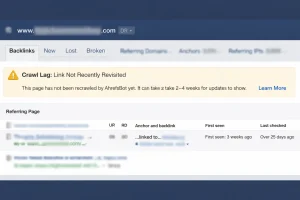
Crawl lag is the most common and least dangerous reason a backlink does not appear in Ahrefs.
Ahrefs operates its own crawling infrastructure. It does not receive instant notifications when a new backlink is created. Instead, it revisits pages based on crawl priority, historical activity, and perceived importance.
Why Crawl Lag Happens?
Ahrefs prioritizes crawling:
- High-authority domains
- Frequently updated sites
- Pages with strong internal linking
- URLs with consistent traffic signals
If your backlink appears on:
- A brand-new blog
- A low-traffic article
- A page buried deep in the site structure
- A site with low Domain Rating
Ahrefs may not revisit that page for several weeks.
For many average websites, 2–4 weeks is completely normal. For very low-priority pages, it can take even longer.
How to Diagnose Crawl Lag?
Ask yourself:
- Is the link live and clickable?
- Is the page indexed in Google?
- Has the page been updated recently?
If the answer to those is yes, the issue is almost always timing.
What You Can Do?
You cannot force Ahrefs to crawl a page, but you can encourage discovery by:
- Building internal links to the linking page
- Sharing the page socially
- Getting the linking page indexed faster in Google
- Ensuring the page is included in the site’s XML sitemap
In most cases, patience is the solution.
2. Robots.txt Block: AhrefsBot Is Not Allowed to Crawl the Site
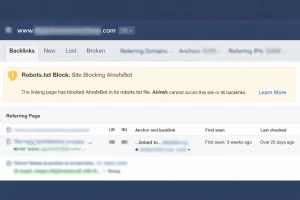
If a site blocks AhrefsBot in its robots.txt file, the backlink will never appear in Ahrefs.
This is not a delay. It is a permanent restriction.
How Robots.txt Works?
Websites can control crawler access using rules like:
User-agent: AhrefsBot
Disallow: /
If this rule exists, Ahrefs is legally and technically obligated not to crawl the site.
This is common on:
- Private blog networks
- Large publishers reducing server load
- Subscription platforms
- Some government or enterprise websites
Why This Creates Confusion?
You might see:
- The page indexed in Google
- The link passing SEO value
- Traffic coming from the link
Yet Ahrefs will show nothing.
That does not mean the link is invalid. It only means Ahrefs cannot see it.
How to Check?
Visit:
https://linkingsite.com/robots.txt
Search for:
- AhrefsBot
- Disallow rules
- Wildcard blocks
If AhrefsBot is blocked, there is no technical workaround unless the site owner removes the restriction.
Warning: Don’t ask a webmaster to change their Robots.txt just for your Ahrefs report. Many large sites block bots to save server costs. If the link is live, Google likely sees it even if Ahrefs doesn’t.
3. The “Noindex” Tag: The Page Is Telling Bots to Ignore It
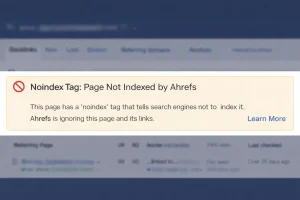
Ahrefs generally ignores backlinks that exist on pages marked with a noindex tag.
A noindex tag looks like this:
<meta name="robots" content="noindex">
Why This Matters?
A noindex directive tells search engines:
“Do not include this page in search results.”
Over time, Google also reduces crawling frequency for persistent noindex pages.
Ahrefs interprets noindex as a signal that the page is not intended to pass meaningful SEO value, so it often excludes links from those pages in the Live index.
Where This Commonly Occurs?
You will frequently see noindex on:
- Thank-you pages
- Login screens
- Gated resources
- Staging environments
- Internal search results
- Temporary landing pages
Important Clarification
A link on a noindex page may:
- Exist publicly
- Send referral traffic
- Be visible to users
But it will likely not contribute long-term SEO value and may not appear in Ahrefs.
If the link is strategically important, ask the site owner whether the noindex tag is intentional.
4. JavaScript Rendering: The “Ghost Link” Problem
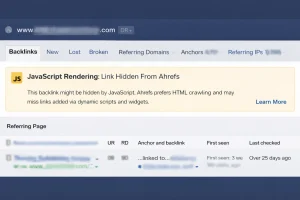
Not all links exist in static HTML.
Many modern websites use JavaScript frameworks like:
- React
- Vue
- Angular
- Dynamic widgets
- Third-party embed systems
If your backlink is injected dynamically, it may not appear in the raw page source.
Why Ahrefs May Miss It?
Rendering JavaScript is computationally expensive.
While Googlebot renders JavaScript extensively, Ahrefs does selective rendering. It prioritizes rendering on higher-authority or more important pages.
If Ahrefs crawls only the initial HTML and your link is injected after load, the crawler may never detect it.
How to Test?
Right-click the page and choose “View Page Source.”
Search for your domain.
- If the link appears in the source code → Ahrefs can likely detect it.
- If the link does not appear → It is dynamically rendered.
In this case, the backlink may:
- Count for Google
- Not appear in Ahrefs
This creates what many SEOs call a “ghost backlink.”
Pro Tip: To quickly see if a link is “Ghosted,” disable JavaScript in your browser settings and refresh the page. If the link disappears, it’s a JS link, and Ahrefs may struggle to report it.
5. Canonical Duplication: The Link Exists on a Duplicate Version
Canonical tags consolidate duplicate content.
A canonical tag looks like:
<link rel="canonical" href="https://example.com/master-page/" />
If your backlink appears on Page A, but Page A declares Page B as canonical, Ahrefs may attribute all signals to Page B.
What This Means in Practice?
You might:
- See your link on a filtered category page
- See it on a paginated version
- See it on a tracking-parameter version
But Ahrefs may:
- Credit the canonical version
- Consolidate the signal
- Or ignore the duplicate URL entirely
Common Situations
Canonical duplication occurs frequently with:
- E-commerce category filters
- Tracking URLs
- Pagination pages
- Mobile/desktop URL variations
- Print versions
If your link is on a non-canonical version, check whether the master version also contains it.
6. Low Page Authority: The Page Is a Crawl Low Priority
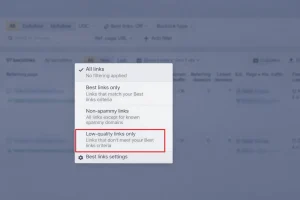
Ahrefs does not crawl every page equally.
It assigns crawl priority based on perceived importance.
Signals That Reduce Crawl Priority
Pages with:
- Zero internal links
- No sitemap inclusion
- No external backlinks
- Low engagement
- Minimal content
- Deep folder structure
Are considered low priority.
These pages may be crawled rarely, sometimes months apart.
Real-World Scenario
A blog post:
- Has no internal links pointing to it
- Receives no traffic
- Was published recently
- Has low authority
Even if your backlink is live, Ahrefs may not return to that page for a long time.
How to Improve Discovery?
Encourage faster crawling by:
- Adding internal links to the linking article
- Ensuring it is in the sitemap
- Promoting the content socially
- Building backlinks to the linking page itself
Crawl priority is about structural importance, not link validity.
Pro Tip: Using Ahrefs Site Audit to Force Discovery
If you’ve built internal links to a new page to help Ahrefs “find” your backlink, you don’t have to wait for the bot to arrive naturally. You can use the Ahrefs Site Audit tool to manually trigger a crawl.
While you cannot force Ahrefs to crawl someone else’s website, you can force it to crawl your own site. If your backlink is on a new page within your domain, or if you have linked to a partner’s guest post from your own blog, this is the fastest way to update the Ahrefs index.
How to Trigger a Manual Crawl:
- Open Site Audit: Navigate to the “Site Audit” tab in your Ahrefs top menu.
- Select Your Project: Click on the project associated with your domain.
- Click “New Crawl”: Look for the button in the top right corner.
- Configure URL Settings (Optional): If you only want to crawl a specific section (like your /blog/), you can adjust the scope to save time.
- Run Crawl: Once finished, Ahrefs will update its internal map of your site, recognizing the new internal links that point toward your backlink.
Why this works: Ahrefs discovers the web by following paths. By forcing a crawl of your own site, you are effectively “shouting” to AhrefsBot that a new path exists. If that path leads to the page with your backlink, the bot is significantly more likely to index it within 24–48 hours.
7. Dashboard Filters: The Link Is Hidden in the Ahrefs Interface
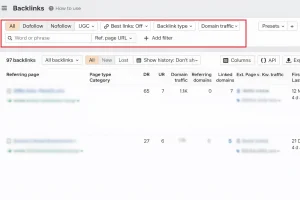
Sometimes the problem is not technical at all.
It is simply a reporting filter.
Ahrefs allows you to filter by:
- Live
- Lost
- New
- Historical
- Nofollow
- Dofollow
- Redirect
- Platform type
- Date range
If you are viewing only “Live” backlinks, recently lost links are hidden.
If you have filtered out:
- Nofollow
- Sponsored
- Redirect links
Those backlinks will not appear in your report.
Common Reporting Errors
| User Mistake | Result |
| Checking only “Live” | Older links disappear |
| Filtering by Dofollow | Nofollow links hidden |
| Using wrong protocol (http vs https) | Partial link count |
| Checking URL instead of domain | Incomplete data |
| Applying DR filter | Low DR links excluded |
Quick Fix Checklist
Inside Ahrefs:
- Switch from “Live” to “All”
- Remove filters
- Check Historical index
- Confirm correct domain version
- Review Nofollow toggle
In many cases, the link was never missing, it was simply filtered out.
Ahrefs Hack: Always check the “Historical” index if a link you previously saw has vanished. This will tell you the exact date Ahrefs last saw the link and why it was dropped (e.g., “Link removed” or “Page not found”).
| Reason | Likely Cause | The “Fix” / Solution |
| 1. Crawl Lag | Bot hasn’t revisited the page. | Wait 7–14 days or share the link on social media. |
| 2. Robots.txt Block | Site owner blocked AhrefsBot. | Check site.com/robots.txt. No fix possible. |
| 3. Noindex Tag | Page is hidden from search. | Check source code for noindex. Ask for removal. |
| 4. JS Rendering | Link is added via script. | View “Source Code.” Use Google Search Console instead. |
| 5. Canonicalization | Duplicate page issue. | Check if link exists on the “Master” (Canonical) URL. |
| 6. Low Authority | Page is a “low priority.” | Build internal links to the linking page. |
| 7. Dashboard Filters | User error in Ahrefs UI. | Switch filter from “Live” to “All” or “Historical.” |
What Does It Mean When Backlinks Are Not Showing Up in Ahrefs?
When backlinks are not visible in Ahrefs, it does not mean the backlinks do not exist. It simply means the tool has not yet discovered, crawled, processed, or reported those links in its database.
Ahrefs operates independently from Google and uses its own crawling infrastructure. Unlike search engines, which prioritize indexing for search results, Ahrefs prioritizes link discovery based on crawl efficiency, page importance, and available resources.
How Missing Backlinks Are Commonly Misunderstood?
Many people assume that:
- A backlink must appear immediately after it is created
- Ahrefs shows the same data Google sees
- Missing backlinks indicate a technical or SEO penalty
None of these assumptions are accurate. Understanding this distinction early helps prevent unnecessary concern.
How Does Ahrefs Discover and Process Backlinks?
Ahrefs discovers backlinks through automated crawlers that scan the web continuously. These crawlers function similarly to search engine bots but operate under different priorities and constraints.
What Happens During the Backlink Discovery Process?
| Stage | What Happens |
| Page discovery | Ahrefs finds a new or updated page |
| Crawling | The page content is scanned |
| Link extraction | Outbound links are detected |
| Data processing | Links are evaluated and categorized |
| Reporting | Backlinks appear in Ahrefs reports |
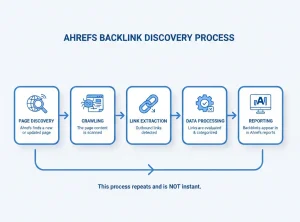
This process does not happen instantly and may repeat multiple times before a backlink is fully reflected in the interface.
How long does it usually take for backlinks to appear in Ahrefs?
There is no fixed timeframe. Backlinks may appear anywhere from a few days to several weeks, depending on several variables.
Key factors that influence backlink discovery speed
| Factor | Impact on Visibility |
| Authority of linking site | Higher authority pages are crawled more often |
| Indexing status | Non-indexed pages are slower to be discovered |
| Internal links | Pages with internal links are found faster |
| Page traffic | Higher traffic pages tend to be revisited more |
| Crawl priority | Low-priority pages may be delayed |
For new or low-authority websites, longer delays are completely normal and expected.
Why Are Backlinks Often Not Showing Up in Ahrefs Even When They Exist?
Backlinks may exist publicly while remaining invisible in Ahrefs due to several non-technical reasons.
Is the Backlink Simply Too New?
Newly placed backlinks are the most frequent cause of delayed reporting. Ahrefs may not have revisited the linking page since the link was added.
Is the Linking Page Indexed?
If a page is not indexed by search engines, it is harder for third-party tools to discover it consistently.
Does Page Authority Affect Crawl Frequency?
Yes. Pages with limited authority, weak internal linking, or low engagement are crawled less often.
Do Link Attributes Affect Visibility?
Links marked as nofollow, sponsored, or UGC are still recorded by Ahrefs, but they may not appear in certain filtered reports.
The Technical Deep Dive: 3 Hidden Blockers That Keep Links Invisible
Timing is the most common reason a backlink hasn’t appeared in Ahrefs yet, but timing isn’t the only culprit. In some cases, technical barriers can permanently prevent Ahrefs from ever reporting a backlink, even when the link is clearly visible to you and is being crawled by Google.
These issues don’t mean the link is “fake” or broken. They simply mean Ahrefs is unable or unwilling to record it.
1. The “AhrefsBot” Disallow Rule
Ahrefs operates as a polite crawler. Unlike some aggressive bots, it strictly obeys the rules set out in a website’s robots.txt file. If a site owner has explicitly blocked Ahrefs’ crawler, Ahrefs will never see any links on that site, full stop.
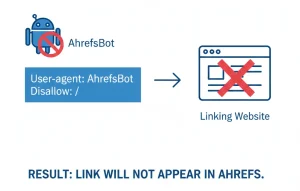
This is surprisingly common on:
- Private networks
- News sites protecting content
- High-traffic publishers trying to limit crawl load
How to check: Visit linking-site.com/robots.txt directly in your browser.
What to look for:
A rule similar to:
User-agent: AhrefsBot
Disallow: /
What this means in practice:
Even if:
- The page is indexed in Google
- The link is dofollow
- The page gets traffic
Ahrefs is technically barred from crawling it. The backlink will never appear in Ahrefs not today, not next month, not ever unless that rule is removed.
This is one of the biggest reasons SEO professionals see links “missing” across different backlink tools.
2. JavaScript Rendering and the “Ghost” Link Problem
Ahrefs’ crawler is powerful, but it does not fully render JavaScript on every page it visits. Rendering JavaScript is computationally expensive, so Ahrefs prioritises it for high-authority or high-importance pages.
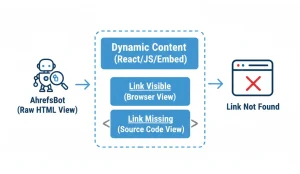
If your backlink is injected via:
- JavaScript widgets
- React / Vue components
- Lazy-loaded content
- Third-party embeds
Ahrefs may only crawl the raw HTML, which can appear empty from a crawler’s perspective.
How to test this yourself:
Right-click the page containing your link and choose “View Page Source” (or press Ctrl + U). Then search for your URL using Ctrl + F.
- If you see the link in the source, Ahrefs can likely find it
- If you don’t see it, the link is being added dynamically
In that case, Google may still understand and credit the link, but Ahrefs might never record it, creating a “ghost link” that exists in reality but not in your backlink report.
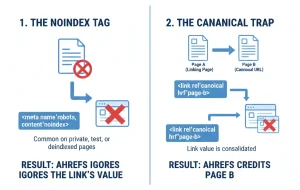
3. The Noindex and Canonical Filter Effect
Ahrefs applies its own link-valuation logic, not just raw crawling. One key rule is that links from pages marked with noindex are generally excluded from backlink reports.
Why this matters:
A noindex tag tells search engines, “Do not show this page in search results.” Ahrefs interprets this as a signal that the page passes no meaningful link equity, so it often ignores the links on that page entirely.
This frequently affects:
- Staging or test pages
- Member-only content
- Category filters and internal search pages
- Old content intentionally deindexed
The Canonical Trap
Canonical tags can cause a similar issue. If the page linking to you declares a different canonical URL, Ahrefs will usually attribute all link value to the canonical version, not the page you’re actually viewing.
So even though:
- You see your link on Page A
- Page A is live and accessible
Ahrefs may only count the link on Page B (the canonical version), or ignore it if the canonical page isn’t crawlable.
Ahrefs vs. Google: The Technical Comparison
The reason for the discrepancy often comes down to how each bot is programmed to behave. Use the table below to determine if your link is being “filtered out” by Ahrefs while Google still counts it.
| Feature | Ahrefs (AhrefsBot) | Google (Googlebot) |
| Robots.txt | Strictly follows. If blocked, the link is invisible. | Strictly follows. If blocked, it can’t crawl but might still index the URL. |
| Noindex Tag | Usually removes the page (and its links) from the “Live” index. | Removes page from search results, but can still “see” the link signal initially. |
| JavaScript Rendering | Selective. May miss links that require user interaction or complex scripts. | Advanced. Renders most JavaScript to find hidden links. |
| Crawl Frequency | Based on “Page Importance” (DR/UR). Low-tier sites are crawled rarely. | Based on “Crawl Budget.” Frequent for news/active sites; slower for static ones. |
| Link Attribution | Reports almost every “Live” link found. | Highly selective. Ignores “low-quality” or “spam” links entirely. |
The “Noindex” Long-Term Trap
A critical detail many marketers miss is the “Noindex = Nofollow” rule.
- For Google: If a page has a noindex tag for a long time, Google eventually stops crawling it. When it stops crawling, it stops passing “link juice” (PageRank) from that page to yours.
- For Ahrefs: Once the page is dropped from their “Live” index due to a noindex tag, the link will disappear from your primary report, even if the link is still physically on the page.
Pro Tip: If your backlink is on a “Thank You” page, a “Login” screen, or a “Gated Resource,” it likely has a noindex tag. These links are great for traffic, but they will rarely show up in Ahrefs or provide a ranking boost.
How Can Missing Backlinks Be Verified Step by Step? – The 5-Step Verification Framework
Before you conclude that a backlink is “lost,” follow this technical sequence to find out exactly where the disconnect is.
Step 1: The “Manual Eye” Test
Open the source URL in an Incognito/Private window. Use Ctrl + F to find your domain.
- Check: Is the link actually there? Is it a “Live” link or just plain text?
- Check: Does it have the rel=”nofollow” or rel=”sponsored” attribute? (Ahrefs might be filtering these out in your default view).
Step 2: Check for Crawl Obstructions (The Robots.txt Check)
This is the most overlooked step. You need to ensure the site owner isn’t accidentally (or intentionally) “hiding” the page from Ahrefs.
- The Action: Go to https://[LinkingSite].com/robots.txt.
- The Search: Look for User-agent: * or User-agent: AhrefsBot.
- The Red Flag: If you see Disallow: / or a disallow rule for the specific folder where your link lives, Ahrefs will never report that link.
Step 3: Verify “Indexability”
If Google hasn’t indexed the page, Ahrefs likely hasn’t prioritized it for a deep crawl.
- The Action: Paste the URL into Google with the site: prefix (e.g., site:linkingsite.com/page-with-my-link).
- The Result: If no results appear, the page isn’t indexed. If Google doesn’t care about the page, Ahrefs won’t either.
Step 4: Inspect the “Header” Tags
Check if the page is telling bots to ignore it.
- The Action: Right-click the page > View Page Source. Search for <meta name=”robots”.
- The Red Flag: If you see noindex or none, Ahrefs will usually exclude this link from your “Live” backlink count.
Step 5: Compare with Ahrefs’ “Internal” Data
Sometimes a link isn’t in the “Backlinks” report but is in the “Recent” or “Historical” index.
- The Action: In Ahrefs, toggle the filter from “All” to “New” and change the view from “Live” to “All”. Often, a link was “seen” but then dropped due to a temporary crawl error.
Updated Verification Checklist
| Checkpoint | Tools Needed | “Pass” Criteria |
| Live Link | Browser | Link is clickable and points to your URL. |
| Robots.txt | Browser | No “Disallow” for AhrefsBot. |
| Indexing | Google Search | URL appears in site: search results. |
| Meta Tags | View Source | No noindex tags found in the <head>. |
| Ahrefs View | Ahrefs UI | Filter set to “All” instead of “Live.” |
How Should Backlinks Be Checked Correctly Inside Ahrefs?
Many backlinks appear missing due to incorrect report settings rather than actual absence.
When using Ahrefs, users should confirm:
- The correct domain version is selected
- Both live and historical backlinks are reviewed
- Filters are not hiding certain link types
- Date ranges are not restricting results
Common Reporting Mistakes and Their Impact
| Mistake | Result |
| Wrong protocol (http/https) | Backlinks appear missing |
| Filters enabled | Links hidden unintentionally |
| Live only view | Older links not visible |
| Wrong URL mode | Partial data shown |
Why Does Google Search Console Show Backlinks That Ahrefs Does Not?
Google Search Console and Ahrefs serve different purposes and collect data differently.
Google reports backlinks that influence search visibility. Ahrefs reports backlinks it has crawled independently. As a result, discrepancies are normal and should not be treated as errors.
Tool Comparison Table
| Feature | Ahrefs | Google Search Console |
| Data source | Third-party crawlers | Google index |
| Update speed | Variable | Search-driven |
| Completeness | Broad but limited | Selective |
| Best use | SEO analysis | Search performance |
Can Backlink Discovery in Ahrefs Be Sped Up Naturally?
Backlink discovery cannot be forced, but it can be encouraged ethically.
Practices That Improve Crawl Discovery
| Practice | Benefit |
| Strong internal linking | Improves page discoverability |
| Indexable pages | Easier for tools to crawl |
| Real traffic sources | Signals importance |
| Stable URLs | Prevents crawl confusion |
Artificial methods or spammy tactics do not improve discovery and often create long-term issues.
What is a Real Example of a Backlink Delay Issue?
A US-based business received a backlink from a newly launched blog. The link was indexed by Google but did not appear in Ahrefs for nearly three weeks.
The reason was structural. The article had no internal links pointing to it. Once internal links were added from older content, Ahrefs discovered the page during its next crawl cycle and the backlink appeared shortly after.
This example highlights that most backlink delays are structural, not technical.
For agencies handling multiple client campaigns, reporting gaps between Google and third-party tools are common, so we’ve documented a practical tracking workflow on our white label link building page (including verification steps and client-friendly reporting).
Which Facts About Missing Backlinks Are Confirmed and Which Are Misconceptions?
Confirmed Facts vs Common Myths
| Topic | Reality |
| Real-time updates | Ahrefs is not real time |
| Missing links | Usually temporary |
| Tool accuracy | No tool is complete |
| SEO impact | Rankings are not affected instantly |
When Should Missing Backlinks Actually Be Treated as a Problem?
Missing backlinks require attention only when accompanied by:
- Sudden backlink loss
- Ranking or traffic decline
- Removal of high-authority links
Without these signals, missing backlinks are usually informational, not critical.
If you’d rather not spend time troubleshooting crawler blocks, noindex issues, and reporting filters, working with a specialist link building agency can help ensure placements land on sites that are regularly crawled and consistently visible across tools.
What Long-term Practices Reduce Backlink Visibility Confusion?
A consistent and realistic monitoring approach is the most effective strategy.
Recommended Monitoring Framework
| Practice | Frequency |
| Backlink audits | Monthly |
| Tool comparison | Periodic |
| Client reporting | With explanation |
| Expectation setting | Ongoing |
Summary: The Backlink Decision Tree
If your backlink is missing, follow this logic to determine your next move. Use this “If/Then” guide to save time and avoid unnecessary outreach to site owners.
- IF the link is live AND the page is indexed by Google:
- Then: Wait. Ahrefs will likely find it in its next crawl cycle (usually within 7–14 days for active sites).
- IF the link is live BUT the page is NOT indexed by Google:
- Then: The problem is with the source site’s quality. Ahrefs won’t show it until Google trusts the page enough to index it. Focus on getting more internal links to that page.
- IF Robots.txt is blocking AhrefsBot:
- Then: Accept that it will never show in Ahrefs. This link still provides “SEO juice” from Google, even if your third-party tools can’t see it.
- IF the link has a “Noindex” tag:
- Then: The link has zero SEO value. Contact the site owner to see if the tag was a mistake, or move on to higher-quality opportunities.
Final Verdict: Should You Be Worried?
In 95% of cases, a missing backlink in Ahrefs is simply a data delay, not an SEO failure. As long as the link is visible in Google Search Console, your rankings are safe. Remember: Ahrefs is a “mirror” of the web, but Google is the “web” itself. Don’t let the mirror’s lag distract you from your actual performance in the search results.
If you’re running paid link campaigns and want to understand what “normal” reporting delays look like (and what isn’t normal), we break it down on our dedicated buy backlinks page, including quality checks to avoid links that never get crawled or indexed.
Frequently Asked Questions
Can Google index backlinks faster than Ahrefs?
Yes. Google’s indexing priorities differ from third-party tools.
Do all backlinks eventually appear in Ahrefs?
Most do, but low-visibility pages may never be crawled.
Does backlink delay affect rankings?
No. Rankings depend on Google, not Ahrefs reporting speed.
Are nofollow backlinks hidden in Ahrefs?
They are visible but may require filter adjustments.
Is it normal for backlinks to disappear later?
Yes. Links can be removed or reclassified.
Should backlink checks be done daily?
No. Weekly or monthly checks are more practical.
Is Ahrefs still reliable despite missing backlinks?
Yes. It remains one of the most reliable third-party SEO tools available.