

Have you ever checked your backlink profile in Ahrefs and wondered what the “Live” backlink status actually means?
If you’re new to SEO or backlink analysis, it’s completely normal to feel confused when you see terms like live backlinks, recent backlinks, and historical backlinks inside Ahrefs reports.
Understanding what is a live backlink on Ahrefs is essential because it helps you determine whether a backlink currently exists and is still part of your website’s backlink profile.
In simple terms:
A live backlink in Ahrefs is a backlink that currently exists on a webpage and has been verified by the Ahrefs crawler during its most recent crawl of that page.
If the link still appears on the page when Ahrefs checks it, the tool categorises that link as live.
In this detailed guide, I will explain:
- What a live backlink means in Ahrefs
- How Ahrefs detects and classifies backlinks
- The difference between live, recent, and historical backlinks
- How to find live backlinks in Ahrefs step-by-step
- Why live backlinks matter for SEO
- Common misconceptions about Ahrefs backlink data
By the end of this guide, you will clearly understand how live backlinks work and how to use them when analysing your SEO performance.
What Is a Live Backlink on Ahrefs?
A live backlink on Ahrefs refers to a link pointing to your website that currently exists on a webpage and has been confirmed by the Ahrefs crawler during its latest crawl of that page.
This means three things are true:
- The linking page still exists
- The link pointing to your website is still present
- Ahrefs has recently verified the link
When these conditions are met, Ahrefs classifies the backlink as live in its backlink index.
Simple example
Imagine a blog post on another website linking to your article.
If Ahrefs crawls that page and confirms the link is still there, the backlink will appear in your Ahrefs report as live.
However, if the link gets removed later and Ahrefs crawls the page again, the backlink may move into another category called historical backlinks.
Why Does Ahrefs Use the Term “Live Backlink”?
Ahrefs uses the term live backlink to indicate that the link still exists on the linking page at the time of the crawler’s last visit.
The internet is constantly changing:
- Pages are updated
- Links are removed
- Content is redesigned
- Websites are deleted
Because of these constant changes, SEO tools need a way to show whether a backlink is still active or no longer present.
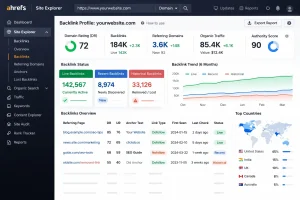
Ahrefs solves this by categorising links based on their current status.
This helps SEO professionals quickly understand:
- Which backlinks still exist
- Which ones were recently discovered
- Which links have disappeared
How Does Ahrefs Discover and Verify Backlinks?
Ahrefs uses a massive web crawler known as AhrefsBot to discover backlinks across billions of web pages.
The crawler works similarly to search engine bots like Googlebot.
How the Process Works?
- AhrefsBot crawls web pages across the internet
- It scans the page’s HTML code
- It identifies links pointing to other websites
- These links are stored in the Ahrefs backlink index
When the crawler finds a link pointing to your website, it records information such as:
- The linking page URL
- Anchor text
- Link type (dofollow or nofollow)
- First time the link was discovered
- Last time the link was verified
If the crawler revisits the page later and finds the link again, the backlink remains live.
What Are the Different Backlink Categories in Ahrefs?
Ahrefs divides backlinks into three major categories to help users understand the status of links over time.
These categories are:
- Live backlinks
- Recent backlinks
- Historical backlinks
Each category reflects how Ahrefs discovered or verified the link.
What Is the Difference Between Live, Recent, and Historical Backlinks?
To fully understand what is a live backlink on Ahrefs, it’s important to compare it with the other backlink categories.
| Backlink Type | Meaning | Status |
| Live Backlink | A link currently present on the page and confirmed by Ahrefs crawler | Active |
| Recent Backlink | A newly discovered backlink recently found by Ahrefs | Newly detected |
| Historical Backlink | A backlink that previously existed but is no longer found | Removed or missing |
Live Backlinks
Live backlinks are links that currently exist and were confirmed during the last crawl of the linking page.
These represent active links pointing to your website.
Recent Backlinks
Recent backlinks are links that Ahrefs discovered recently but may not have been verified again yet.
These links might later become live backlinks if the crawler confirms they still exist.
Historical Backlinks
Historical backlinks are links that Ahrefs discovered previously but can no longer find on the page.
These links may have been:
- Removed
- Deleted
- Hidden
- Changed during website updates
How to Use Live vs. Historical Data to Recover Lost SEO Value?
When a link moves from Live to Historical, your website loses “Link Juice” (authority). This is known as Link Rot.
Instead of always building new links, you can often “reclaim” these lost ones with much less effort. Here is a 3-step workflow to do it:
1. Identify “High-Value” Lost Links
Don’t try to recover every link. Focus on the ones that actually moved the needle.
- Go to Site Explorer > Backlink Profile > Backlinks.
- Select the Historical filter.
- Filter by DR (Domain Rating) 30+ and Link Type: Dofollow.
- Look at the Link lost column to see why it disappeared (e.g., “Link removed” or “404 not found”).
2. Diagnose the “Link Rot” Reason
Click the “Show changes” button in Ahrefs to see the exact HTML change.
- If the page is a 404: The website owner might have deleted the post accidentally or moved it.
- If the link was removed: They may have updated the article and felt your link was no longer relevant.
- If it’s a broken redirect: You may have changed your own URL without setting up a 301 redirect.
3. Reach Out (The Recovery Pitch)
Once you know why the link is gone, send a polite, helpful email.
Pro-Tip: Don’t demand the link back. Frame it as helping them fix a “broken user experience” on their site.
Example Outreach Script:
“Hi [Name], I was reading your post on [Topic] and noticed that the link to our guide on [Subject] is currently leading to a 404 error (or was recently removed). If you’re still updating that piece, I’ve actually just refreshed our guide with 2026 data, would you like the updated link to keep the resource active for your readers?”
Why Do Backlinks Move from Live to Historical?
Backlinks move between categories when Ahrefs crawls pages and detects changes.
Several factors can cause a live backlink to become historical.
Link Removal
The website owner may remove the link intentionally during content updates.
Page Deletion
If the linking page is deleted, the backlink disappears.
Website Redesign
Many backlinks disappear when websites restructure their content or change page URLs.
Broken Pages
If the linking page returns an error such as 404, Ahrefs cannot verify the link.
Content Editing
Sometimes editors update articles and remove external links to reduce clutter.
When Ahrefs detects these changes during a crawl, the backlink is moved into the historical category.
Live Backlinks vs. Referring Domains: What’s the Difference?
It is common to see a high number of Live Backlinks but a much lower number of Referring Domains. Here is the simple breakdown:
- Referring Domain: This is a unique website (e.g.,
nytimes.com). Even if they link to you 100 times, they count as one referring domain. - Live Backlink: This is every individual link found. If
nytimes.comlinks to you from 10 different articles, you have 10 Live Backlinks but only 1 Referring Domain.
SEO Pro Tip: Focus on growing your Referring Domains. Search engines generally value a single link from 10 different high-authority sites much more than 10 links from the same site.
Deep Dive: Confused about which metric matters more for your rankings? We wrote an entire guide comparing these two. [Click here to read our full guide: Referring Domains vs. Backlinks Explained]
How Can You Check Live Backlinks in Ahrefs?
Finding live backlinks in Ahrefs is simple if you follow the correct steps.
Step 1: Open Site Explorer
Log in to your Ahrefs account and open Site Explorer.
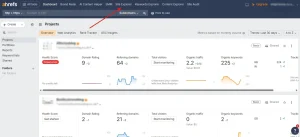
Enter the domain you want to analyse.
Example:
yourdomain.com
Click Search.
Step 2: Go to the Backlinks Report
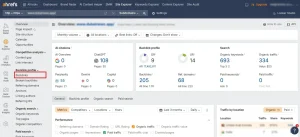
In the left sidebar, navigate to:
Backlink profile → Backlinks
This section displays all backlinks discovered by Ahrefs.
Step 3: Filter by Live Backlinks
By default, Ahrefs shows live backlinks.
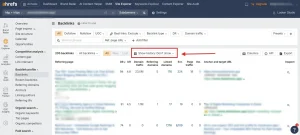
However, you can filter results by:
- Live
- Recent
- Historical
Selecting live will display only active backlinks.
Step 4: Analyse the Backlink Metrics
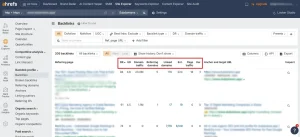
For each backlink, Ahrefs provides useful metrics such as:
- Referring domain
- Domain Rating (DR)
- Anchor text
- First seen date
- Last check date
- Link type
These metrics help you evaluate the quality and relevance of each backlink.
Why Are Live Backlinks Important for SEO?
Live backlinks are important because they represent active links pointing to your website from other websites.
Search engines consider backlinks as signals of authority, trust, and relevance.
They Strengthen Your Backlink Profile
A strong backlink profile with high-quality live backlinks can improve your website’s authority.
They Help Monitor Link Building Campaigns
If you are building backlinks through outreach or guest posting, live backlinks help you confirm that the links still exist.
They Help Detect Lost Backlinks
Monitoring live backlinks also helps you identify lost links that may need recovery.
Recovering a lost backlink is often easier than building a new one.
They Help Evaluate Link Quality
By analysing live backlinks, you can assess:
- Link relevance
- Domain authority
- Anchor text distribution
This information helps improve your SEO strategy.
Can a Live Backlink Still Have No SEO Value?
Yes. A live backlink does not automatically guarantee SEO value.
Even if a link is live, several factors influence whether search engines consider it valuable.
Link Attributes
Some links may contain attributes like:
- nofollow
- sponsored
- ugc
These attributes tell search engines how to treat the link.
Low Authority Websites
Links from low-quality or spammy websites may provide little SEO benefit.
Irrelevant Links
If the linking page is unrelated to your niche, the SEO value may be limited.
Therefore, it is important to focus on quality backlinks rather than just the number of live backlinks.
How Often Does Ahrefs Update Live Backlinks?
Ahrefs continuously crawls the web and updates its backlink index.
However, the frequency of updates depends on several factors.
Website Popularity
Popular websites are crawled more frequently.
Page Importance
Pages with many backlinks may be revisited more often.
Crawl Budget
Ahrefs allocates crawl resources across billions of pages.
Because of this, some pages may be updated faster than others.
This means that a link might exist on a page but Ahrefs may not have crawled the page yet to verify it.
What Are Common Misconceptions About Live Backlinks?
Several misconceptions exist about how live backlinks work in Ahrefs.
Misconception 1: Live backlinks mean Google counts the link
Ahrefs data comes from its own crawler.
Google uses its own crawling and indexing systems, so it may treat links differently.
Misconception 2: Ahrefs shows every backlink on the internet
No SEO tool can discover every backlink.
Ahrefs only displays links that its crawler has found.
Misconception 3: A lost backlink is gone forever
Some historical backlinks may become live again if the link reappears.
Real-Life Example of Tracking Live Backlinks
Imagine I run a digital marketing blog and publish an article about SEO tools.
A well-known marketing website references my article and links to it.
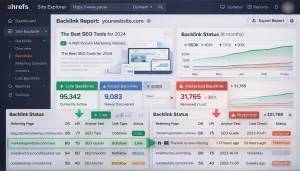
When Ahrefs crawls that page and detects the link, it appears as a live backlink in my backlink report.
Six months later, the website updates its article and removes the link.
During the next crawl, Ahrefs notices the link is missing.
The backlink then moves from live to historical.
By monitoring my backlink report regularly, I can identify the lost link and contact the website owner to restore it.
How Can You Maintain a Strong Live Backlink Profile?
Maintaining a healthy backlink profile requires consistent monitoring.
Here are several strategies that help.
Monitor Backlink Reports Regularly
Checking your backlink data frequently helps identify changes in your link profile.
Recover Lost Backlinks
If an important backlink disappears, contacting the site owner may restore it.
Focus on Quality Link Building
Prioritise links from:
- Industry-relevant websites
- Authoritative publications
- Trusted blogs
Perform Backlink Audits
Regular audits help detect:
- Toxic links
- Spam backlinks
- Broken links
This ensures your backlink profile remains healthy.
Conclusion: Why Understanding Live Backlinks in Ahrefs Matters?
Understanding what is a live backlink on Ahrefs helps you analyse your backlink profile more effectively and monitor your SEO performance.
A live backlink simply means the link still exists on a webpage and has been verified by Ahrefs during its latest crawl.
These links represent active connections between websites, which may contribute to your website’s authority and search visibility.
By regularly analysing live backlinks in Ahrefs, you can:
- Monitor link building campaigns
- Detect lost backlinks
- Maintain a strong backlink profile
- Improve your long-term SEO strategy
When used correctly, Ahrefs’ backlink data becomes a powerful tool for understanding how other websites connect to your content.
Frequently Asked Questions
How long does a backlink stay live in Ahrefs?
A backlink remains classified as live as long as Ahrefs continues to find the link during its crawls of the linking page.
Can a backlink appear as live even if the page is not indexed by Google?
Yes. Ahrefs may detect backlinks on pages that Google has not indexed.
Why did my live backlink disappear?
The link may have been removed, the page may have changed, or Ahrefs may have crawled the page after the link was deleted.
Do live backlinks guarantee higher rankings?
No. Rankings depend on many factors such as link quality, relevance, content quality, and search intent.
What is the difference between referring domains and live backlinks?
Referring domains represent the number of unique websites linking to you, while backlinks represent the total number of individual links.
Can historical backlinks become live again?
Yes. If a link reappears on the page and Ahrefs crawls it again, it may move back into the live category.
How can I increase the number of live backlinks?
You can increase live backlinks through strategies such as guest blogging, digital PR, outreach campaigns, and creating link-worthy content.