

Yes, Ahrefs does count internal links on a site, but they are not included in the main backlink reports that most SEO professionals look at first.
Instead, internal links appear in separate reports inside Ahrefs, such as:
- Internal Backlinks in Site Explorer
- Internal link reports in Site Audit
- Best by Links (Internal)
This distinction is important because Ahrefs treats external backlinks and internal links as two different types of signals.
Backlinks measure the authority your website receives from other websites, while internal links help search engines understand how the pages on your site are connected.
When I started using Ahrefs for SEO analysis, I initially assumed that the link counts shown in reports included every link pointing to a page. However, after exploring the platform more deeply, I realized that Ahrefs intentionally separates internal and external links to give a clearer picture of a website’s authority and structure.
In this detailed guide, I will explain:
- Whether Ahrefs reports count internal links
- Where you can find internal link data in Ahrefs
- How Ahrefs discovers links on a website
- The difference between backlinks and internal links
- Why internal linking still plays a major role in SEO
If you regularly analyze websites using Ahrefs, understanding how internal links are counted can help you interpret reports more accurately and improve your SEO strategy.
What Does Ahrefs Actually Count as a Link?
Ahrefs records multiple types of links during its web crawls, including external backlinks, referring domains, and internal links. However, these link types are categorized and displayed in separate reports.
To understand how Ahrefs counts links, it helps to know the main link categories the platform tracks.
Backlinks
Backlinks are links from other websites pointing to your site. These are the most commonly discussed links in SEO because they act as authority signals.
For example:
- A blog linking to your article
- A news website referencing your research
- A directory listing your business website
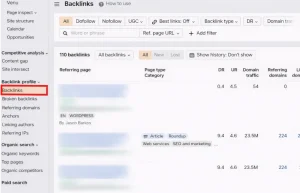
These links appear in Ahrefs metrics such as:
- Total backlinks
- Referring domains
- Domain Rating influence
Backlinks are important because they signal to search engines that other websites trust your content. Many businesses also work with a link building agency like ClickDo IO to acquire high-quality backlinks from relevant websites, which can significantly improve a site’s authority and search rankings.
Referring Domains
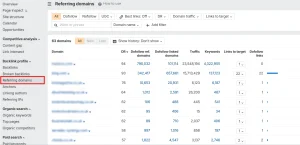
A referring domain represents a unique website linking to your site.
For example:
If one website links to your site 10 times, it still counts as one referring domain but 10 backlinks.
This metric is useful because search engines often value links from multiple different domains more than many links from the same domain. Agencies that manage SEO campaigns for multiple clients often use white label links to scale backlink acquisition while maintaining consistent quality across different websites.
Internal Links
Internal links are hyperlinks that connect pages within the same website.
For example:
- A blog post linking to another article
- A category page linking to individual posts
- A homepage linking to important sections of a website
Internal links help search engines understand:
- Website structure
- Content hierarchy
- Relationships between topics
Ahrefs tracks these links when it crawls your website, but they appear only in internal link reports.
Technical Deep-Dive: Where Ahrefs Finds Your Internal Links?
1. Site Explorer vs. Site Audit: The Two Data Sources
It is a common mistake to think Ahrefs only has one “list” of links. In reality, it uses two different methods to find them:
- Site Explorer (The Global View): This shows internal links discovered by Ahrefs’ main web crawler during its regular trip across the internet. It’s great for seeing how Ahrefs “perceives” your site’s authority from the outside.
- Site Audit (The Internal View): This is far more accurate. When you run a Site Audit, Ahrefs performs a custom crawl of your specific site. It finds every single link in your navigation, footer, and body text, including those that the global crawler might have missed.
2. Mastering the “Internal Backlinks” Report
Once you are in Site Explorer, navigate to the Internal Backlinks report. This is where the real SEO work happens. To move the needle on your rankings, use these two advanced filters:
- Target HTTP Code: Filter for “404 Not Found” to instantly see every internal link on your site that is pointing to a dead page. Fixing these is the fastest way to reclaim “leaked” link equity.
- Link Type (Nofollow): Ensure your important internal links aren’t accidentally marked as
rel="nofollow". If they are, you’re telling Google not to pass authority to your own pages.
3. The “Link Opportunities” Tool (The 2026 Strategy)
If you want to rank in the top 3, you need to use Ahrefs’ Link Opportunities tool inside the Site Audit section. This tool doesn’t just count links; it uses AI to suggest where you should add new ones. It looks at the keywords your pages already rank for (in the top 10) and then finds other pages on your site that mention those exact keywords but don’t link to the ranking page yet. Adding these “missing” links is the most effective way to boost a page from position #8 to position #2.
4. Technical Nuance: JavaScript Rendering
Many modern sites (built with React, Vue, or Next.js) hide links inside JavaScript. Standard crawlers often miss these. However, Ahrefs’ crawler is capable of JavaScript rendering. In your reports, look for the “JS” tag next to a link. This indicates that Ahrefs had to execute JavaScript to “see” that internal link. If your most important internal links only appear with a JS tag, ensure your site’s technical performance is high so Googlebot doesn’t time out before it finds them.
Do Ahrefs Reports Count Internal Links on a Site?
Yes, Ahrefs reports count internal links on a site, but they are displayed in specific internal link reports rather than backlink reports.
This is a common point of confusion for many users.
When you open Ahrefs and look at the main backlink metrics, such as:
- Total backlinks
- Referring domains
- Anchor text reports
You are seeing only external links from other websites.
Internal links are excluded from these reports because Ahrefs categorizes them separately.
This separation helps users distinguish between:
| Link Type | Description |
| Backlinks | Links from external websites |
| Internal links | Links between pages on the same website |
By separating these metrics, Ahrefs ensures that backlink reports accurately represent external authority signals.
Where Can You See Internal Links in Ahrefs?
Although internal links do not appear in backlink reports, Ahrefs provides several reports specifically designed to analyze them.
These reports help SEO professionals evaluate the internal structure of a website.
Internal Backlinks in Site Explorer
The Internal Backlinks report in Site Explorer shows which pages on your website link to a specific page.
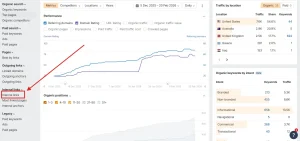
This report includes information such as:
- Source page (where the link originates)
- Target page (the page receiving the link)
- Anchor text used
- Link type
For example, if your article about SEO tools links to a guide about keyword research, Ahrefs will record this connection.
This report is useful for identifying:
- Pages receiving strong internal support
- Pages that may need more internal links
- Anchor text patterns used in internal linking
Internal Links in Site Audit
Another powerful way to analyze internal links in Ahrefs is through the Site Audit tool.
Site Audit crawls your entire website and builds a detailed map of its internal linking structure.
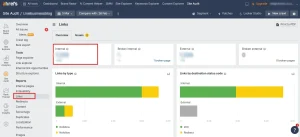
This tool helps identify issues such as:
- Orphan pages
- Broken internal links
- Pages with too few internal links
- Pages with excessive links
Understanding these issues can help improve both SEO performance and user experience.
Best by Links (Internal)
The Best by Links report can also be filtered to show internal links.
This allows you to see which pages receive the most internal links within your website.
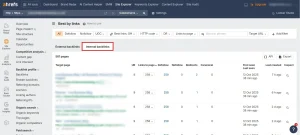
Typically, pages with the most internal links include:
- Homepage
- Main category pages
- Cornerstone content
- Important guides
These pages often serve as the central hubs of a website’s content structure.
Difference Between Backlinks and Internal Links in Ahrefs
Although both involve hyperlinks, backlinks and internal links serve different purposes in SEO.
The table below highlights the key differences.
| Feature | Backlinks | Internal Links |
| Source | External websites | Same website |
| SEO function | Authority and trust signals | Site structure and navigation |
| Where shown in Ahrefs | Backlink reports | Internal backlink reports |
| Impact on rankings | Strong ranking signal | Supports crawlability and relevance |
| Discovery method | Global web crawl | Website crawl |
Backlinks are generally considered more powerful ranking signals, but internal links still play an essential role in helping search engines understand the importance of pages within a site.
How Ahrefs Crawls and Discovers Internal Links?
Ahrefs uses its own crawler to discover links across the web and within individual websites.
This crawler works in a similar way to search engine crawlers.
The process usually involves several steps.
- The crawler visits known URLs.
- It scans the page’s HTML for hyperlinks.
- It records the relationships between pages.
- It follows new links to discover additional pages.
During this process, Ahrefs collects data about both external backlinks and internal links.
Confirmed Facts
Ahrefs confirms that it discovers links by crawling webpages and recording hyperlinks found within the page content.
When its crawler scans a website, it detects links that point to other pages on the same domain and stores them as internal links.
Limitations of Third-Party Crawlers
Although Ahrefs has a large crawler, it does not always see every link.
Some factors can limit link discovery.
Examples include:
- Pages blocked by robots.txt
- Links generated by complex JavaScript
- Pages located deep within the site structure
- Recently added pages not yet crawled
This means the internal link counts you see in Ahrefs may differ slightly from what search engines detect.
Why Internal Links Matter for SEO?
Even though internal links do not count as backlinks, they still play a critical role in search engine optimization.
Internal linking helps search engines:
- Discover new pages
- Understand content relationships
- Determine page importance
- Distribute authority throughout the site
Strong internal linking can improve how search engines interpret your website.
Real-Life SEO Scenario
While auditing a content-heavy website, I came across a situation that clearly showed how internal linking can influence visibility.
The site had dozens of blog posts covering SEO topics. One article in particular was a detailed guide about technical SEO, and the content itself was well-written, comprehensive, and genuinely helpful. However, when I reviewed the internal backlinks report, I noticed that only two other pages on the site linked to that guide.
Because the page had very few internal links pointing to it, several issues became apparent:
- Search engines were less likely to interpret the page as an important piece of content within the website.
- Crawlers had fewer pathways to reach the page during site crawls.
- The page had limited internal authority being passed from other pages.
Even though the content was strong, its ranking potential remained limited because the internal linking structure did not support it.
To address this, I improved the internal linking strategy for that page. I added contextual links to the guide from:
- Several related blog posts discussing SEO strategies
- A relevant category page covering SEO topics
- A cornerstone guide that already had strong internal visibility on the site
After making these adjustments, the guide started receiving significantly more internal links from relevant content across the website.
As a result:
- The page began receiving more internal link equity from stronger pages
- Search engines could more easily discover and revisit the page
- The guide gradually started ranking higher for several technical SEO keywords
This experience reinforced an important SEO principle: internal links can strengthen important pages even when no new external backlinks are acquired. By simply improving the internal linking structure, it is possible to make valuable content more visible to both search engines and users.
Common Misunderstandings About Ahrefs Internal Links
Many misconceptions exist about how Ahrefs counts internal links.
Separating facts from misunderstandings can help prevent incorrect SEO conclusions.
Confirmed Facts
The following points are supported by Ahrefs documentation.
- Ahrefs tracks internal links during website crawls.
- Internal links appear in dedicated reports.
- Backlink metrics exclude internal links.
Proposed or Discussed Ideas
Some SEO professionals believe internal links can influence metrics like URL Rating indirectly by distributing authority across a site.
While internal linking does redistribute link equity, the exact algorithms used by Ahrefs remain proprietary.
Misinformation
A common misconception is that Ahrefs counts internal links as backlinks.
This is not correct.
Backlink reports include only links from external websites, while internal links are recorded separately.
How I Use Ahrefs to Analyze Internal Linking?
When auditing a website, I typically follow a structured process to evaluate internal linking using Ahrefs.
First, I check the Internal Backlinks report to identify which pages receive the most internal links.
Next, I run a Site Audit to detect technical issues related to internal linking.
Common problems include:
- Orphan pages
- Broken links
- Pages buried too deep in the site structure
Finally, I improve internal linking by connecting related pages.
For example:
- Linking blog posts to cornerstone articles
- Adding contextual links inside content
- Strengthening category pages
This approach helps improve the overall crawlability and authority flow within the website.
Step-by-Step: How to Check Internal Links in Ahrefs?
If I want to analyze internal links in Ahrefs, the process is fairly simple and practical. Ahrefs makes it easy to see how pages on a website connect to one another, which is useful for improving site structure, authority flow, and crawlability.
Here is how I check internal links step by step.
1. Log in to Ahrefs
I begin by signing in to my Ahrefs account so I can access the tools needed for link analysis.
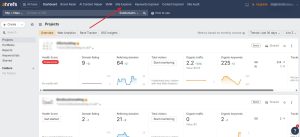
2. Open Site Explorer
From the Ahrefs dashboard, I go to Site Explorer, which is the main tool for analyzing a domain, subdomain, or specific URL.
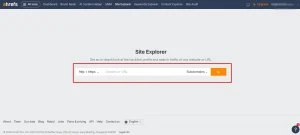
3. Enter your website domain or a specific page URL
Next, I enter either:
- the full website domain, if I want a broader view of internal links across the site, or
- a specific page URL, if I want to see which internal pages link to that particular page
This helps me focus the analysis based on whether I am reviewing the site as a whole or checking support for one important page.
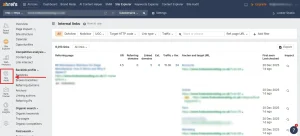
4. Navigate to Internal Llinks
Once the data loads, I open the Internal Backlinks report. This section shows the internal links pointing from one page on the site to another.
Here, I can usually review details such as:
- the source page
- the destination page
- the anchor text used
- whether the link is live and relevant
5. Review the list of internal links pointing to the page
At this stage, I study the list carefully to understand how well the page is connected within the site structure.
I look for things like:
- whether important pages are receiving enough internal links
- whether the links are coming from relevant content
- whether the anchor text makes sense
- whether there are missed opportunities to add stronger contextual links
This step is especially useful when I want to improve the visibility of a page that is valuable but underperforming.
6. Use Site Audit for a full internal link analysis
After reviewing the Internal Backlinks report, I usually move to Site Audit for a more complete picture.
Site Audit helps me identify broader internal linking issues such as:
- orphan pages
- broken internal links
- pages with too few internal links
- structural weaknesses in the site architecture
This gives me a wider understanding of how the entire website is connected, not just one page.
Overall, this process allows me to quickly understand how pages on a website are linked together and where internal linking improvements can be made. It is a useful way to spot weak pages, strengthen important content, and build a clearer SEO structure.
Best Practices for Internal Linking Using Ahrefs Data
To improve your internal linking strategy, consider the following best practices.
- Link to important pages from multiple relevant articles.
- Avoid leaving pages without internal links.
- Use clear and descriptive anchor text.
- Maintain a logical website hierarchy.
- Audit internal links regularly.
These practices help improve both SEO performance and user navigation.
The “Physics” of Internal Links: URL Rating (UR) Impact
Most SEOs focus only on backlinks from other sites, but the “physics” of Ahrefs’ URL Rating (UR) tells a different story.
Ahrefs calculates UR on a logarithmic scale from 0 to 100, and it is heavily influenced by internal link equity distribution. Just like Google’s original PageRank, internal links act as “conduits” for authority. If you have a high-DR (Domain Rating) homepage but your deep service pages have a low UR, it’s usually because your internal linking structure is “leaking” power.
Technical Tip: Use Ahrefs to find your highest UR pages. By adding just 2-3 internal links from those “powerhouse” pages to a struggling blog post, you can often see a rank jump without building a single new external backlink.
Conclusion
So, do Ahrefs reports count internal links on a site?
Yes, Ahrefs does track internal links when it crawls your website. However, these links are not included in the main backlink metrics that measure external authority.
Instead, internal links appear in dedicated reports such as:
- Internal Backlinks in Site Explorer
- Internal link analysis in Site Audit
- Best by Links (internal)
Understanding this difference allows you to interpret Ahrefs reports more accurately and use the platform to improve your website’s internal structure.
When used correctly, internal linking insights from Ahrefs can help strengthen important pages, improve crawlability, and support long-term SEO performance.
Frequently Asked Questions
Does Ahrefs show internal backlinks for every page?
Ahrefs can display internal backlinks for most pages that its crawler has discovered. If a page has not yet been crawled or indexed in the Ahrefs database, its internal links may not appear immediately.
How often does Ahrefs update internal link data?
Ahrefs updates link data whenever its crawler revisits a website. Large or popular websites may be crawled more frequently than smaller sites.
Can internal links influence URL Rating in Ahrefs?
Internal links can help distribute authority from stronger pages to weaker pages within the same website. However, URL Rating primarily reflects backlink strength rather than internal links alone.
Why does the number of internal links change in Ahrefs reports?
Internal link counts may change when a new crawl occurs, when pages are added or removed, or when the website’s structure is updated.
Are internal links important for search engine rankings?
Yes. Internal links help search engines understand which pages are important, how content is organized, and how users navigate the website.
Can Ahrefs detect orphan pages automatically?
Yes. The Site Audit feature can identify pages that do not receive internal links from other pages on the same website.
Should internal links be optimized regularly?
Yes. Regular internal link audits help maintain a clear website structure, prevent orphan pages, and ensure that important content receives sufficient internal support.